
Languages
Write in one language, or publish every article in several — localised for each market, not machine-translated.
RankPine writes in one main language by default: the one set under Settings → Profile. If you sell into more than one market, you can add additional languages and every article will ship in all of them.
Your main language
Settings → Profile → Language is the language every article is written in. Pick the language your readers search in — it doesn't have to match your site's interface. There are 100+ to choose from, including regional variants where the writing genuinely differs (British vs American English, European vs Brazilian Portuguese, Spain vs Mexico Spanish, and so on).
Choosing English (UK) or English (Australia) rather than English (US) gets you that variety's spelling and conventions throughout — not just a different flag.
Publishing in several languages
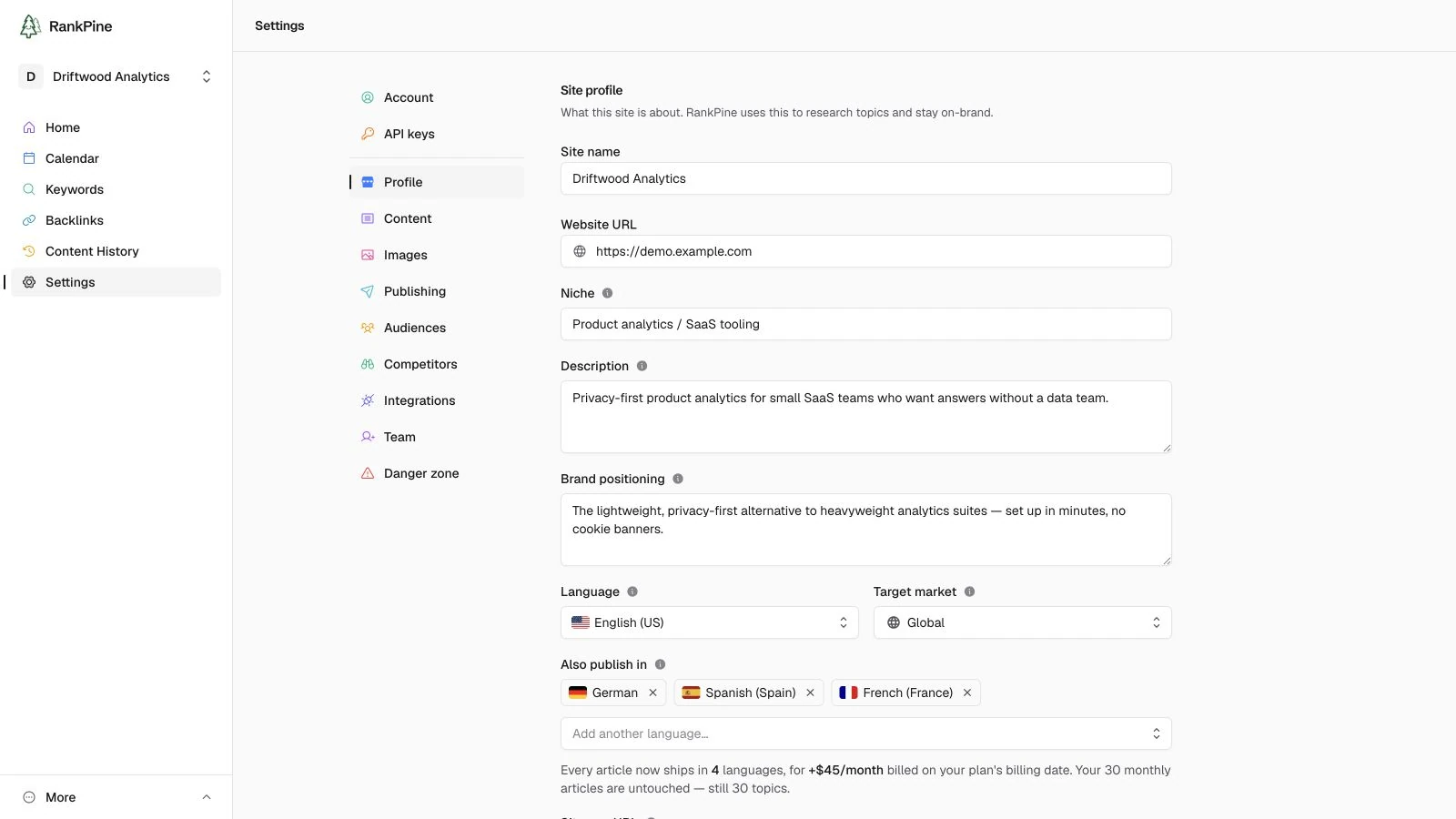
Under Settings → Profile → Also publish in, add up to five languages alongside your main one. From then on, every new article ships in all of them. Each is $15/month, added to your subscription (see what it costs). Only the site's owner can change this, since it changes the bill.
Localised, not machine-translated
Each version is rewritten the way a native writer would have written it: idiom, structure, and examples adapted for that language. The facts, numbers, sources, links, and images stay identical — only the writing changes.
Here's what happens for each article:
Written once, properly
The article is researched and written in your main language first, and goes through the full pipeline — the anti-slop edit, fact-checking, citations, images.
Localised into each language
Each additional language is then adapted from that finished article. The research isn't repeated, because it doesn't need to be — the facts are already settled. The same quality rules apply in every language.
Published as its own post
Every version is a real article with its own title, slug, and publish status, and each publishes separately to your CMS. Nothing is bundled together.
What it costs
$15 per language, per month, added to your subscription — and that's it. Your 30 monthly articles are for topics, and languages don't touch them:
| Languages | Added to your bill | Articles published / month | Topics / month |
|---|---|---|---|
| Just your main language | — | 30 | 30 |
| Main + 1 extra | $15/mo | 60 | 30 |
| Main + 2 extra | $30/mo | 90 | 30 |
| Main + 5 extra | $75/mo | 180 | 30 |
You can add up to five extra languages per site.
How billing works, step by step
Pick a language
Add it under Settings → Profile → Also publish in. The running price is shown as you pick. Only the site's owner can — it changes the subscription.
Confirm it once
Your first language needs a one-time confirmation on Billing — it starts a separate line on your subscription, so it needs your OK the same way your plan did. Until you confirm, the languages are saved but articles don't ship in them yet, and you're not charged.
On a free trial there's nothing to confirm yet: languages are billed separately and don't have a trial of their own, so we don't start them until your plan converts. Pick them now if you like — they'll be waiting, and nothing is charged before then.
After that it's automatic
Add or remove languages whenever you like and your subscription just reprices, prorated — no more confirmations. Add a fourth language mid-month and you're charged the part-month difference; remove one and you're credited the same way.
Removing your last language stops the add-on
Drop to zero languages and the add-on is cancelled outright, so you're not left paying for nothing. If you add a language again later it's a fresh start — one confirmation, then automatic again.
Cancelling your plan cancels the languages with it. You never end up paying for translations of a site that isn't publishing.
Why languages aren't charged as articles
Because they don't cost like articles. The research and writing happen once, in your main language; each extra version reuses all of it — the same facts, sources, and images — so it's a fraction of the work. Charging one of your 30 for it would have meant paying full price for a fraction of the job, and halving how many topics you could cover. $15/month is the honest version.
Switching between versions
Open any article and use the language switcher in the header, next to its status. It lists every version with its own status — so a group mid-write reads as "English generated, German still writing" at a glance. The original is marked Original.
On the calendar and in History, a topic stays a single entry with small flags showing which languages it covers — not one row per language.
Publishing & your CMS
Translations publish through your existing integrations. Where the CMS supports native localization, RankPine links them to the original article. Publish the original first.
- Hosted Blog — language-specific listings and feeds, a language switcher, and reciprocal
hreflanglinks are automatic. New translations use paths such as/de/article-slug. Existing article URLs stay unchanged. - WordPress with the RankPine plugin — WPML and Polylang relationships are assigned automatically when the article's languages are enabled. Update the RankPine plugin first. Application-password connections still publish separate posts.
- Webflow — enable Localization before publishing. New article groups get a shared CMS item with locale variants. To add a language to an older item, first add its locale in the Designer.
- Strapi 5 — enable i18n on the collection and its title, body and slug fields. Use automatic
locale selection and refresh the discovered schema. Translations share a document ID;
your frontend controls public language URLs and
hreflang. - Framer — enable project locales and use a user-managed collection with automatic locale selection. Translations share the original CMS item; images remain shared.
- Shopify — authorize translation access and enable the languages in Shopify Markets. New translations belong to the original article, using its handle and cover image. They share its publication state, so review translations in RankPine before publishing.
- Wix — install Wix Multilingual. New translated posts join the original post's translation group. Wix cannot merge existing independent posts through the publishing API.
- Other CMS connections — each version continues to arrive as a separate post.
- Webhook / REST — each version is its own delivery, carrying
article.languageand a sharedarticle.translationGroupIdfor your own language routing.
Unavailable or ambiguous CMS locales stop publishing with a setup error instead of silently replacing content in another language. Existing independent CMS posts are not bulk-migrated.
Changing your mind
- Removing a language stops future articles shipping in it and drops $15/month off your next invoice, prorated. Articles already written and published stay exactly where they are — nothing is deleted or unpublished.
- Changing your main language applies to new articles. Existing ones keep the language they were written in.
- Editing an article doesn't re-translate its other versions; each version is edited on its own. If you've reworked the original and want a version to catch up, re-translate it deliberately (below).
Re-translating a version
Open the version and choose Re-translate from the ⋯ menu. It's rewritten from the current original, replacing what's there. Useful when you've edited the original since, or you just want another pass at a translation you don't like.
If a version failed, its page has a Retry translation button instead. This is worth knowing: a failed translation is the one thing RankPine won't quietly pick up again on its own — the topic's original already succeeded, so nothing brings the scheduler back to it. Retrying is a single click and doesn't use an article from your monthly allowance.
Already-published versions can't be re-translated
Your CMS would get a second post rather than an updated one — RankPine publishes a new post each time and can't edit one that's already live. If you need a published version rewritten, update it in your CMS, or archive the post there and publish a fresh version.
Keyword research is per-site, not per-language
RankPine researches keywords in your main language and each version targets the natural rendering of that keyword in its own language. It doesn't run separate keyword research per market, so if a language has its own genuinely different search demand, add those keywords by hand under Keywords.