
AI visibility
Track your brand in AI answers and turn missed mentions into useful content topics.
AI visibility shows where your brand and competitors appear in sampled answers from ChatGPT, Gemini, and Google AI Mode. Open any check to read the saved answer and its cited sources, then use what you learn to plan content in RankPine.
An optional paid add-on
AI visibility costs $49 per site per month, separately from your writing subscription. An active paid RankPine subscription is required. Your writing plan’s free trial does not include paid AI visibility checks.
The add-on includes:
- 25 prompts checked daily across three platforms.
- Your brand and up to 10 competitors.
- Brand visibility, citation rate, share of voice, and competitor comparisons.
- Saved answers, cited sources, and content opportunities.
- 90 days of answer history.
Start with English-language questions in the United States, United Kingdom, Canada, or Australia. Each site tracks one market. Shopify-native add-on billing is not available in this release.
Activate tracking
Open AI visibility from the dashboard sidebar. The subscription panel shows the monthly add-on price and included features over a blurred sample dashboard. Select the information icon beside the page title for an explanation and a link to this guide. Background results are illustrative and are not measurements of your website.
The site owner can activate the add-on by confirming the brand name, optional aliases, and market. Review the prorated charge and recurring monthly price, then confirm payment authorization. Tracking starts after payment succeeds. The add-on uses the same saved payment method and Polar billing setup as additional languages and extra articles.
The allowance is 25 saved questions, each rechecked daily, not 25 new questions to write every day. Start with 5–10 questions a potential customer would actually ask. For example:
| Prompt type | Example |
|---|---|
| Discovery | Which time tracking tools work best for a small design studio? |
| Comparison | How do Fieldwork and Hourglass compare for project budgeting? |
| Branded | Does Fieldwork support invoicing for client projects? |
These are fictional examples. Use your own category and brand. Questions must be 10–500 characters. Branded questions naturally mention your name more often; use the prompt-type filter to assess discovery separately.
For ideas, open Add prompt → Suggest prompts. RankPine uses your saved site description, positioning, audiences, competitors, brand settings, and tracking market to suggest up to six questions. Select one to fill in the question and prompt type, edit it, then choose Add prompt to start tracking. Suggestions do not use a prompt slot until you add them.
You can request suggestions once per minute, up to 20 times per site per day and 30 times across an account’s sites. Keep your site profile and audience settings accurate to get more relevant questions.
The competitors in your site’s competitor settings are compared in the same answers. You can save up to 10 competitors per site. Give each competitor a clear brand name and domain. No extra provider calls are needed to compare them.
Read your results
The screenshots below use illustrative data for Driftwood Analytics, a fictional demo site. They show how to read the dashboard, not results collected from AI platforms. Select any screenshot to open it at full size.
Overview
Overview shows separate cards for brand visibility, citation rate, and share of voice. The date range, platform, and prompt-type filters in the header apply across all views. On smaller screens, open the filter icon in the header to change them.
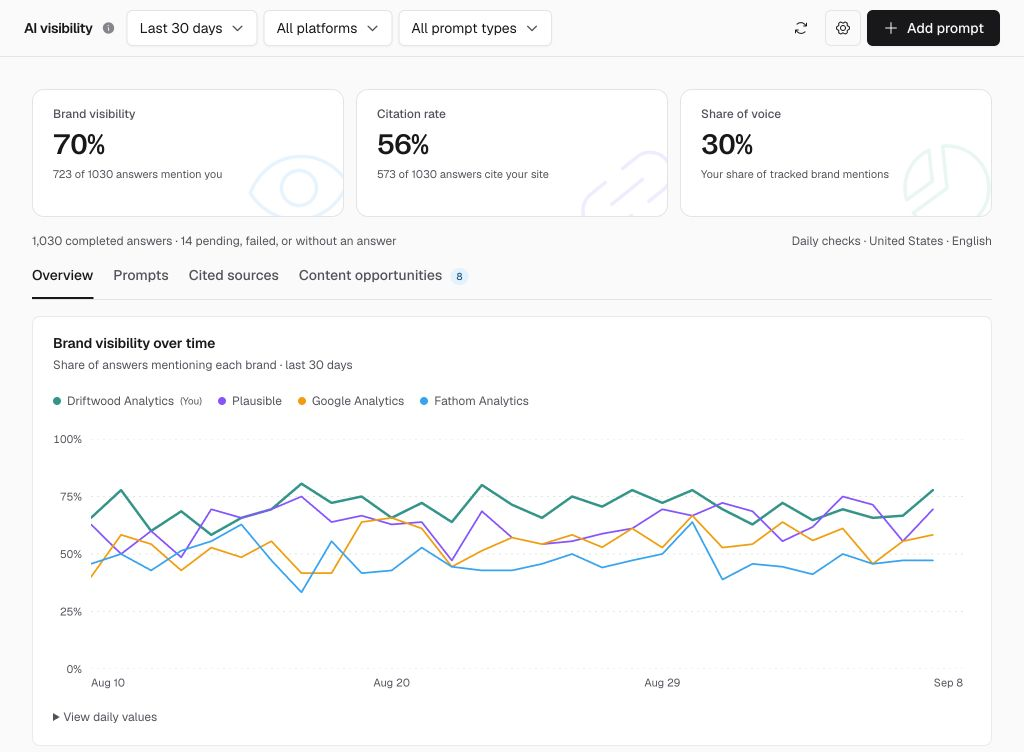
Compare your brand’s daily visibility with competitors while keeping mentions, citations, and share of voice separate.
The daily chart compares your brand with tracked competitors; select a brand in the legend to hide or show it, and hover or use the arrow keys to inspect a day. Expand View daily values for the same data in a table. Below the chart, the platform breakdown shows mentions, citations, and completed answers; select a platform to filter the dashboard. The brand comparison ranks visibility using each brand’s own sample count.
Prompts
Prompts shows the latest check for each question and platform, including its date. Open a cell for the saved answer and sources. Pause a prompt to stop checking it while keeping its slot. Archive it to free the slot; its existing answers remain in history until they expire.
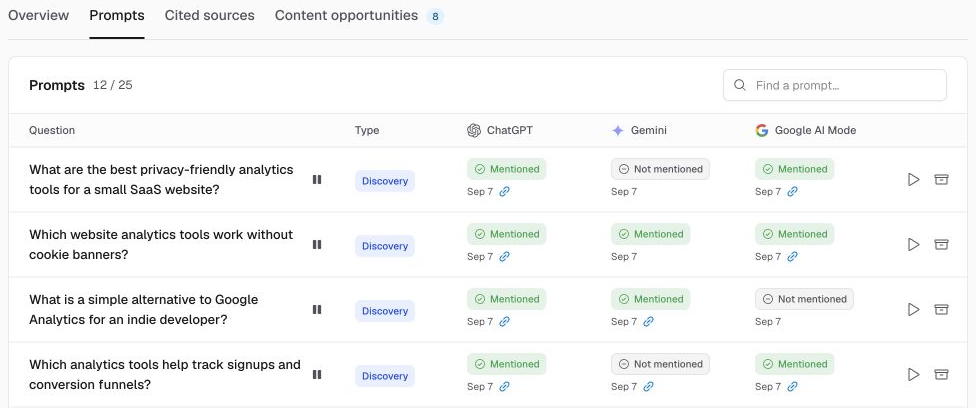
Read across a question to compare platforms. The link icon marks a website citation; select a result to inspect the answer.
Saved answers and cited sources
Open a result to see the saved answer alongside Brands in this answer and Cited sources. Check the wording and linked pages to understand why a brand was counted as mentioned or cited.
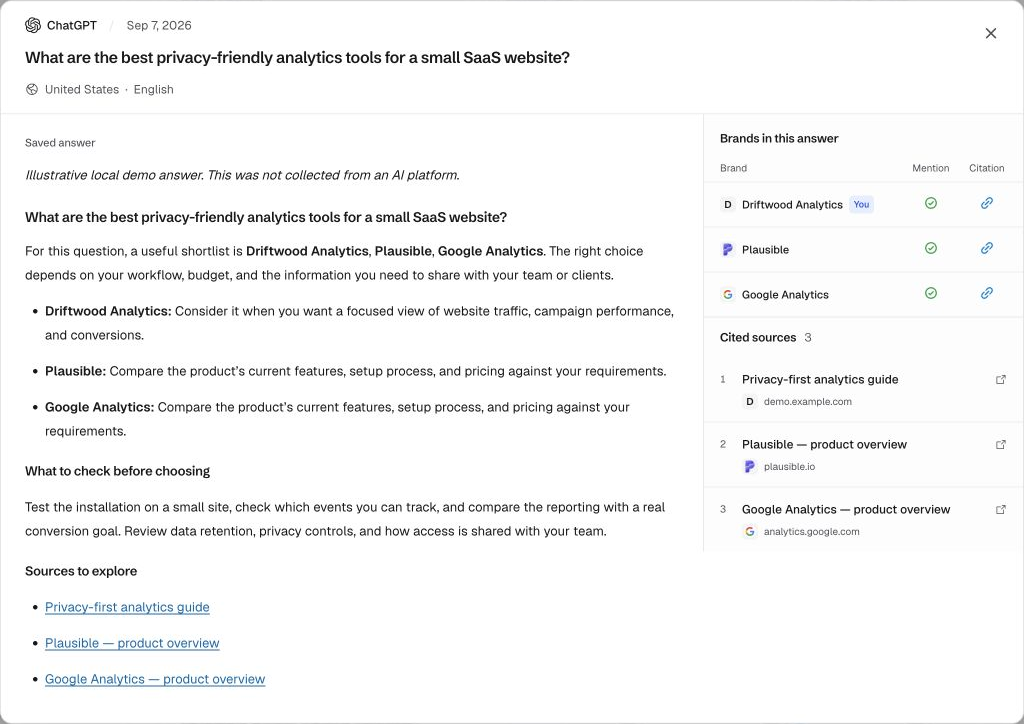
The saved answer keeps its platform, date, and market together with the text and cited sources.
Cited sources shows up to 100 frequently referenced URLs, ranked by the number of completed answers citing them. A source is counted once per answer.
Content opportunities
Content opportunities shows latest answers where a tracked competitor is mentioned and you are not. Select a question to read the evidence, then select Plan topic. Use Generate suggestions to preview relevant search phrases, choose a suggestion or enter your own keyword, then select Add to keywords. Generating suggestions does not add anything to your plan. The full question is kept as the article’s focus. Keyword research runs in the background; your content plan settings control scheduling and publishing. New articles use your writing plan’s allowance.
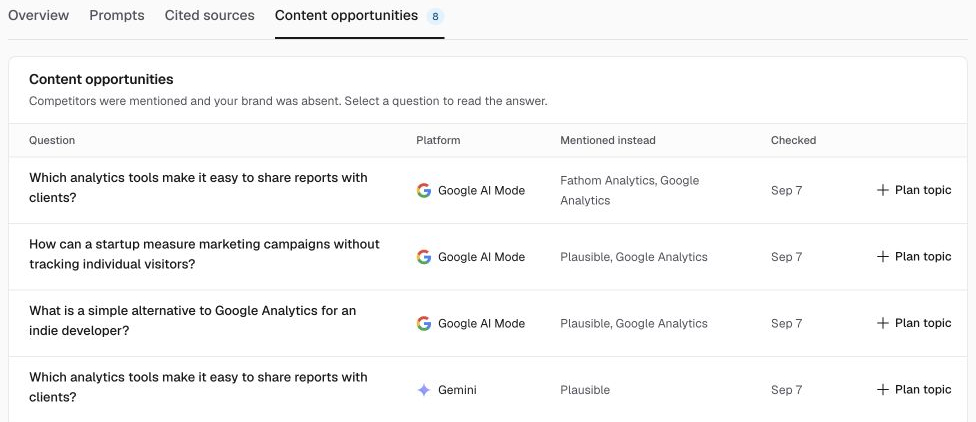
Use the question and competing brands to identify a useful topic, then review the answer before adding it to your keyword plan.
What the metrics mean
| Metric | Calculation |
|---|---|
| Brand visibility | Completed answers mentioning your brand ÷ all completed answers |
| Citation rate | Completed answers citing your domain or a subdomain ÷ all completed answers |
| Share of voice | Your brand mentions ÷ all mentions of the brands being tracked |
| Competitor visibility | Answers mentioning that competitor ÷ answers where it was tracked |
A brand counts at most once per answer. A mention names your brand; a citation references your website. You can receive either without the other.
Failed checks, pending checks, and checks without an answer are excluded from score denominators and shown separately. A dash means there is no usable sample. Zero means completed answers were collected but none matched your brand or domain.
Collection and freshness
RankPine collects independent samples from the platforms’ web interfaces through DataForSEO. Each check records its market, date, brand configuration, full answer, and sources. These are not personalized reproductions of every user’s experience.
Daily collection begins at 06:30 UTC. Processing time depends on provider availability. New prompts are queued when added and usually begin receiving answers within minutes. There is a shared limit of 75 check attempts per site per UTC day, including failed attempts. Replacing prompts does not reset it. Failed or interrupted checks are picked up in a later daily cycle rather than retried indefinitely.
Changing a brand name, aliases, market, competitors, or prompt set changes what is measured. Existing answers are preserved with their original settings. Trends across different samples should not be interpreted as a controlled comparison.
Brand matching uses the name and aliases you provide. Short or ambiguous names may match unrelated text. Inspect the saved answer and use more precise aliases when needed.
AI visibility is not audience reach, prompt search volume, a revenue metric, or a guarantee of a future citation. Publishing useful content can be worth testing; AI platforms decide what to recommend.
Billing and cancellation
AI visibility is billed monthly even if your writing plan is annual. Activating partway through a billing period charges a prorated amount shown before confirmation. Taxes may apply.
Only the site owner can purchase, cancel renewal, or change brand settings. Team members with content access can read results and manage prompts.
Cancel from AI visibility → Settings → Cancel renewal. Tracking continues through paid add-on coverage while your main subscription remains active. Your writing subscription is separate. Answers remain available within their 90-day retention window; no automatic refund is issued.
If payment fails, open Billing to update the saved payment method and retry the charge. Tracking requires current paid coverage and an active main subscription.