SEO Keyword Cannibalization: Find and Fix Overlap

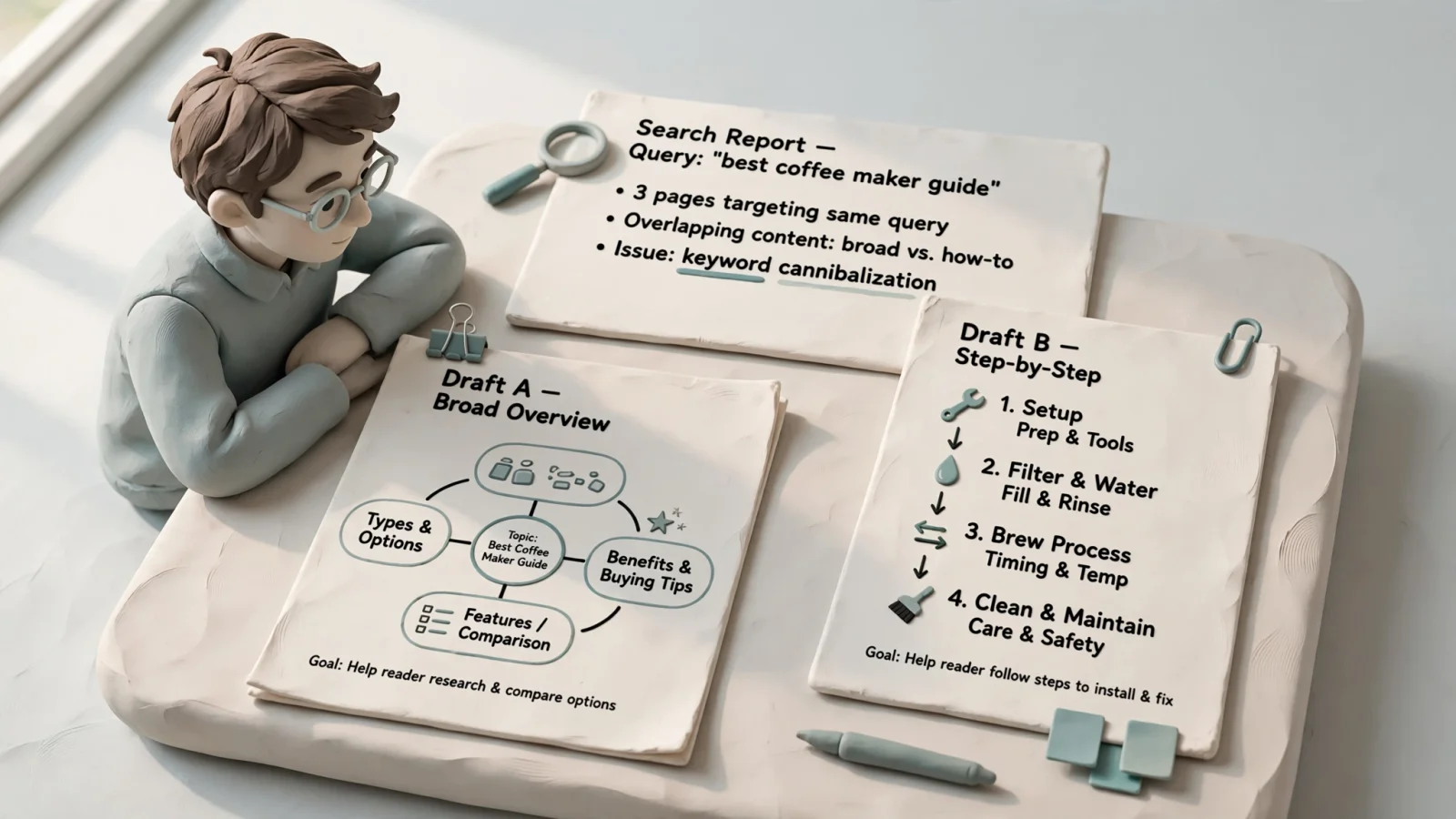
SEO keyword cannibalization can occur when multiple pages on your website target the same search intent and compete for the same query family, potentially splitting your traffic or causing search engines to rank the wrong URL. A shared keyword across several articles is a reason to investigate, but it does not automatically mean those pages are harming your site. The conflict only requires intervention when two distinct URLs try to complete the identical reader task, confusing the search engine and weakening the overall search performance of both assets.
Addressing this overlap requires moving beyond spreadsheet keywords to look at the job each page does for the reader. When you build a site strategy, grouping concepts by their intended purpose prevents unnecessary duplication. You can map out a plan to cover a topic from multiple angles, provided each angle serves a distinct need. The goal is to map topics to specific URLs across your publishing schedule, so every new post adds unique value rather than overwriting the work an existing page already does.
What Keyword Overlap Means for Search Performance
Many site owners treat any instance of two URLs appearing for the same query as a technical error. This strict interpretation often leads you to delete useful content or arbitrarily merge pages that serve different audiences. To identify cannibalization, define the problem narrowly: a problem exists only when multiple URLs appear for the same query family, serve substantially the same search intent, and the overlap visibly weakens the site's overall search performance.
Ahrefs explains that pages with different search intents can rank for the same query without needing a fix when the overlap does not harm overall organic performance, so an in-depth guide and a downloadable checklist ranking for the same query are not automatically a cannibalization problem if they serve distinct intents.
Confusion often arises from older duplicate content warnings. You might fear that publishing similar articles triggers an automatic penalty or mechanically splits a fixed amount of domain authority between the two pages. Google clarifies that ordinary duplicate content is not a spam-policy violation, and their systems are designed to group similar pages and select one as the canonical version. However, that automated canonicalization is meant for technical duplicates like tracking parameters or print-friendly URLs, rather than editorial overlap. Leaving search engines to guess which of your three beginner guides is the definitive version means giving up control over which page your audience sees.
Why Daily Publishing Creates Blog-on-Blog Overlap
Publishing frequently can increase the chances of overlap as your site covers more of an industry. When you use an automated SEO content platform like RankPine to generate and publish well-researched articles every day, your archive grows rapidly. A larger library naturally creates more opportunities for two articles to brush against the same subject.
This overlap happens when you write new content briefs without checking the existing archive. You might plan a series of articles around workflow automation, dispatching titles to the calendar based on search volume. If you do not verify what the site already says about the topic, a new daily post might inadvertently promise the exact answer as an article published six months ago, resulting in two pages fighting for the same reader task.
To maintain a daily publishing cadence without building a backlog of competing URLs, you need a lightweight topic-to-URL map. Before adding a new brief to the schedule, document the query family, the intended reader task, the specific target URL, and the distinct angle. When you sit down to find winnable topics for the upcoming month, this map acts as a boundary check.
Before an automated platform drafts the next post, ask what the new page will answer that the current owner of that topic does not. If the new outline covers the same steps, targets the same audience, and offers the same takeaways, pivot to improving the existing article rather than commissioning a near-duplicate. RankPine handles the disciplined daily scheduling and dual optimization for both Google and AI search platforms like ChatGPT, but setting the distinct intent for each daily post remains a foundational editorial responsibility.
Find Candidate Pages With Google Search Console
Search Console provides query-to-URL data that can help you spot potential conflicts, but it cannot decide whether pages compete. The reports document what happened in the search results, leaving you to interpret whether the behavior points to conflicting intents or healthy multi-format coverage.
Filter Query Families and Review Metrics
Start your investigation by navigating to the Search results report within the Performance section. Because exact-match keyword data rarely tells the whole story, filter for a query family rather than a single phrase by clicking the new filter button, selecting Query, and choosing the Custom (regex) option to include natural variations, stop-word changes, and related phrasings that match the pattern you set.
Once the filter is active, open the Pages tab below the chart. This view lists every URL on your site that Google showed in the search results for that specific query family during the selected timeframe. Review the clicks, impressions, click-through rate (CTR), and average position metrics to establish diagnostic context. You might see one URL commanding 95% of the impressions while another picks up the remaining 5%, or you might see two URLs splitting the impressions almost evenly.
A near-even split shows that both URLs are appearing for the query family, but it doesn't by itself reveal why. If URL A received all the traffic in January and URL B received all the traffic in February, Google may have shifted which URL it favors, offering a clue of competition. However, the mere presence of multiple URLs in this report is not a definitive threshold for cannibalization.
Validate Intent and Note Reporting Limits
After identifying candidate URLs, manually compare their roles by evaluating each page's primary reader task, target audience, headline promise, and format. If one page is a strategic overview for executives and the other is a technical implementation guide for developers, they do not share an intent, even if they share a keyword.
Account for Search Console's reporting limitations when making these evaluations. In the Performance report, the Pages tab aggregates data by page, so its table totals can differ from property-level totals in the chart, as Google's Search Console documentation notes.
If you suspect two pages are competing but only one appears in the Pages tab, the search engine may have already consolidated them internally. Use the URL Inspection tool on the missing page to check which URL Google selected as the canonical version. If Google has decided the missing page is a duplicate of the ranking page, the performance metrics will only appear under the chosen canonical URL. By checking whether the pages answer the same intent and how Google currently indexes them, you can avoid unnecessary changes to your site architecture.
Choose the Right Fix for Each URL
When you confirm an overlap, resolve the conflicting page intents rather than removing a shared keyword. Avoid altering a functional title tag or rewriting an introduction to remove a specific phrase while leaving the underlying purpose identical to another URL. Instead, change what the page does for the reader.
The right editorial intervention depends on the specific relationship between the two pages. Evaluate the candidate URLs against this framework to determine the appropriate action:
| Situation | Recommended Action | Implementation Details |
|---|---|---|
| The URLs answer different tasks or serve different formats | Keep both | Clarify each page's distinct purpose in its title, opening paragraph, and scope. Add useful cross-links explaining when a reader should switch to the other resource. |
| Both pages are valuable, but their current promises overlap significantly | Re-angle | Give each URL a strictly defined question, audience, use case, or deliverable. Rewrite the substance and structure to separate their utility entirely. |
| The pages substantially duplicate the same answer | Consolidate and redirect | Merge the unique, useful material from the weaker page into the stronger page. Implement a permanent 301 redirect from the retired URL to the surviving URL. |
| Nearly identical URL versions must remain accessible for users | Canonicalize | Apply a self-referencing canonical tag to the preferred version and point the duplicate version's canonical tag to the preferred URL. |
Keeping both pages is the correct choice when your investigation reveals distinct intents. If you group by intent, a pricing page and a technical tutorial can safely target the same core concept. Ensure the distinction is immediately obvious to a user clicking through from the search results by tightening the introductory paragraphs and adjusting the title tags to reflect the specific format.
Re-angling requires structural work. If you have two introductory guides that cover 80% of the same material, change the premise of one. You might shift an overly general "Guide to Email Marketing" into a specific "Email Marketing for B2B SaaS" guide by rewriting the examples, adjusting the tone, and changing the actionable advice to fit the narrower audience.
Consolidation helps when two pages answer the same task and one stronger page would serve the reader better. Choose the surviving destination based on its historical performance across the entire query family, the quality of its backlink profile, and how well its URL slug fits the overarching topic, then move any distinct, helpful paragraphs or charts from the retiring page to ensure the merged content flows logically.
Once the surviving page is updated, permanently redirect the retired URL. Google uses permanent redirects as a signal that the target should become canonical, and it recommends a permanent server-side redirect whenever possible when a URL needs to change in search results.
Canonical tags are hints that search engines might override if signals are mixed, meaning they do not replace the need to distinguish two different articles or consolidate pages competing for the same informational intent. Reserve canonical tags for situations where duplicate or highly similar pages must physically remain on the site, such as tracking URLs, paginated archives, or category pages with sorting parameters.
Worked Example: Two Blog-Planning Guides
Consider a site that published a post at /blog-publishing-schedule/ early in its history, and later published /how-to-plan-blog-publishing/ to cover similar ground.
When reviewing the Search Console data, you might see both URLs appearing for the exact same query family. A closer inspection reveals that both are long-form prose guides answering the identical planning question, sharing the same target audience of marketing managers, offering similar advice about consistency, and recommending the same planning steps, leaving no distinct reader task to preserve.
Reviewing the performance metrics and link profiles shows the older schedule page has accumulated more external links, while the newer planning page has a clearer formatting structure. The fix is to consolidate by moving the superior formatting and updated examples from the newer page into the older, better-linked /blog-publishing-schedule/ URL. Setting up a permanent 301 redirect from the newer URL to the older one combines the authority and answers the reader's intent on a single page.
A third URL on the same site, /blog-content-calendar-template/, might also occasionally appear for the same broad planning queries in Search Console. Inspecting this page reveals a different format and reader task, consisting of a brief introduction, a downloadable spreadsheet, and instructions on how to use the specific cells.
Because this page provides a useful, distinct deliverable rather than repeating the theoretical planning advice, you can keep it separate. Clarify the title tags to highlight the word "Template" and add cross-links between the long-form prose guide and the downloadable spreadsheet, signaling to both users and search engines that the two URLs serve complementary purposes.
Prevent Repeat Overlap and Measure the Change
Cleaning up existing overlap improves the current site architecture, but preventing future collisions requires a change to your daily publishing workflow. Build a pre-publish check into the workflow before adding any new concept to your calendar.
Every planned URL should have an assigned owner, a target query family, a distinct reader task, and a clear angle that differentiates it from the existing archive. You can use an online SEO keyword generator to find long-tail variations and related questions, but you should manually verify that the resulting topics do not duplicate existing page intents. If a proposed topic duplicates an intent, redirect your editorial effort toward updating the existing page with fresh data or expanding its depth.
After you consolidate or re-angle competing pages, measure the impact by reviewing the query family's combined clicks and impressions over comparable date ranges. Watching the average position metric alone is unreliable, as positions fluctuate naturally and can be skewed by personalized search results.
If URL A previously received 100 clicks and URL B received 50 clicks, monitor the surviving URL to see if it achieves 150 clicks or more after consolidation. Treating the combined click and impression trends as the primary indicator of success helps you account for seasonal changes or broader site updates during the measurement window, without imposing a fixed mathematical threshold. A successful consolidation stabilizes the search engine's understanding of your site architecture, meaning users land on the single best page you offer.
Building a consistent organic presence requires keeping your content architecture clean while maintaining a steady output. RankPine automates the heavy lifting of your SEO content strategy, researching winnable keywords and publishing one high-quality, fully cited article to your CMS every day. By combining daily consistency with optimization for both Google and modern AI platforms, RankPine helps solo founders and lean teams grow their traffic without the manual drafting burden. Learn how to automate your daily publishing schedule at RankPine.