
Odoo Blog
Connect Odoo 17, 18, or 19 directly through its external API and publish native Blog posts without installing an Odoo add-on.
RankPine publishes directly to Odoo's native blog.post model. There is no
RankPine marketplace module to install and no custom Odoo controller to maintain.
The connection flow detects the server version before it selects a protocol.
Supported versions
| Odoo release | RankPine protocol | Authentication | Status |
|---|---|---|---|
| 17.x | XML-RPC at /xmlrpc/2 | Login + API key + database | Supported and covered by adapter tests |
| 18.x | XML-RPC at /xmlrpc/2 | Login + API key + database | Supported and covered by adapter tests |
| 19.x | JSON-2 at /json/2 | Bearer API key; database header when needed | Preferred and covered by adapter tests |
| 19.x | XML-RPC at /xmlrpc/2 | Login + API key + database | Bounded fallback only when JSON-2 is not exposed |
RankPine rejects Odoo 16 and earlier, future major releases, and customized Blog models that do not expose the required fields. It never guesses a generic RPC call for an unknown version.
Odoo 19 introduced the External JSON-2 API. The legacy object RPC service is deprecated in 19, so RankPine will not fall back because a key is expired, a record rule denies access, or the subscription does not include external API access. Those errors must be fixed at the source.
Hosting and plan requirements
The integration works with:
- Odoo Online on the Custom plan. Odoo states that external API access is not included with One App Free or Standard.
- Odoo.sh projects whose public HTTPS host exposes the external API.
- Self-hosted Odoo 17, 18, or 19 instances reachable over public HTTPS.
Both the Website and Blog apps must be installed. RankPine verifies the
website, blog.blog, blog.post, and ir.attachment models during discovery.
Create a dedicated Odoo user
Use a service user created for RankPine. Give it Website Editor access and only the websites/blogs it should manage. Odoo still applies access rights, field access, and record rules to every API call, so a full administrator account is not required or recommended.
The user needs to:
- read the selected Website and Blog;
- create and update Blog posts;
- publish posts if the RankPine connection uses Live mode;
- create attachments linked to those posts if image upload is enabled; and
- read internal users if you want RankPine to list optional Blog authors.
If author discovery is blocked, leave Author set to Use the dedicated user. Publishing can continue without broadening access to the user directory.
Generate the API key
- Sign in as the dedicated user.
- Open Preferences / My Profile → Account Security.
- Choose New API Key, name it for RankPine, and set an appropriate expiry.
- Copy the key immediately. Odoo displays it only once.
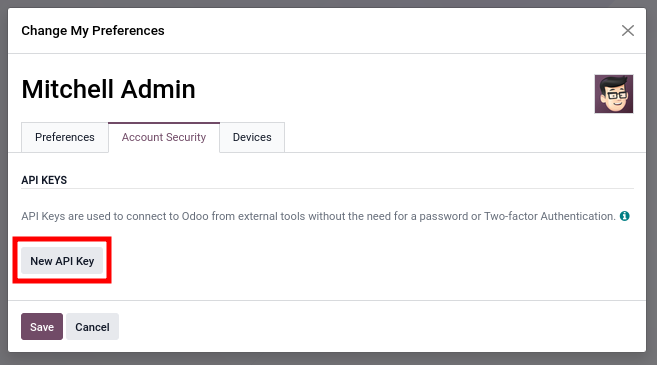
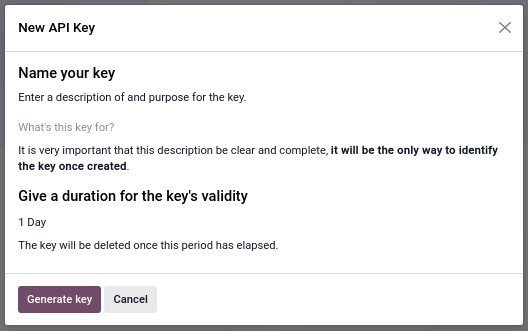
Odoo 19 key rotation
Odoo 19 API keys have a maximum lifetime and must be rotated. Reconnect RankPine with the replacement key before the current key expires. The screenshots above come from Odoo's official 19.0 external API documentation.
Connect RankPine
In RankPine, open your site and go to Integrations → Odoo Blog → Connect.
Enter the Odoo origin
Use the public HTTPS origin, such as https://mycompany.odoo.com. Do not add
/web, /json/2, or /xmlrpc/2.
Enter database and login when required
For Odoo Online, RankPine can derive the database from the single-tenant
<database>.odoo.com hostname. For another host, it uses Odoo's public database
list only when that endpoint is enabled and returns exactly one database.
Enter the database explicitly when the host serves multiple databases, the list is disabled, or hostname routing is ambiguous. This is normal for secured self-hosted and Odoo.sh deployments. Odoo 17/18 and the Odoo 19 XML-RPC fallback also require the dedicated user's login.
Detect and discover
Paste the API key and choose Detect & discover. RankPine shows the detected version and selected protocol, then lists only blogs visible to that user. Pick one Blog and, optionally, an author.
Choose draft or live
- Live Blog post sets Odoo's publication state after the complete post and media are ready.
- Unpublished draft leaves the native Odoo post unpublished for review.
Keep Store article images in Odoo enabled to upload the cover and inline
images as ir.attachment records. RankPine rewrites the HTML to Odoo media URLs
and sets the native Blog cover properties when that field is available.
What RankPine sends
For the supported standard Blog models, RankPine writes:
- title (
name); - subtitle and manual teaser where available;
- HTML body (
content); - requested slug (
seo_name); - SEO title and description;
- selected Blog and optional partner author;
- publication date;
- draft/live state;
- cover image; and
- inline images stored in Odoo attachments.
Every create starts unpublished. RankPine links its private ownership marker and uploads media before the final write makes a Live post public, so visitors do not see a half-populated new article.
Updates and duplicate prevention
RankPine stores the Odoo blog.post record ID in its publish log and supplies it
as existingExternalId for edits. An update first confirms that the record still
belongs to the selected Blog and is visible under the dedicated user's record
rules.
New posts also receive a private RankPine ownership marker in Odoo attachments. If a create response is interrupted, the retry uses that marker plus the exact Blog, title, and SEO slug to recover the post. Ambiguous matches stop with an error instead of creating or claiming another post.
Troubleshooting
External API is not available
Odoo Online needs the Custom plan. One App Free and Standard cannot be fixed by changing the API key. For Odoo.sh or self-hosted Odoo, confirm that the relevant external API route is reachable through the reverse proxy.
Enter the database name
The host did not identify one database safely. Enter the exact database shown by
your Odoo administrator. Do not enable the public database manager solely for
RankPine; Odoo recommends hostname dbfilter routing and disabling database
listing on production hosts.
Blog app is missing
Install both Website and Blog in that database. A Website page without the
native Blog app is not a blog.post publishing target.
No blogs are listed
The API works, but the dedicated user cannot read an active blog.blog record.
Check its Website role, allowed companies/websites, and record rules.
Permission or record-rule error
Grant the smallest missing Website/Blog capability. RankPine does not use
sudo, bypass record rules, or ask for a full administrator token.
API key expired or was revoked
Generate a replacement for the same dedicated user, then choose Reconnect in RankPine. Odoo 19 keys must be rotated before their configured expiry.
Model fields changed
Custom modules can remove, rename, or restrict standard Blog fields. RankPine rechecks the live field set and stops with the missing names. Restore the standard fields or use a tested standard Odoo 17/18/19 Blog model; RankPine will not guess custom mappings.
Disconnecting
Disconnecting deletes RankPine's encrypted credential envelope and stops future delivery. Revoke the API key in Odoo Account Security as the final step. Existing Odoo posts and media stay in your database.