SEO Content Pruning: A Better Decision Framework

SEO content pruning involves reviewing your existing URLs to keep or improve useful pages, consolidate genuine overlap, redirect to a relevant successor, and remove pages with no recoverable reader or business value. A systematic review protects your search visibility, keeps readers on relevant paths, and focuses your maintenance budget on assets that perform. Completing this workflow gives you a clear decision for every underperforming article in your archive and a safe implementation sequence that preserves your internal link structure.
Before beginning, you need administrative rights in Google Search Console, Google Analytics 4, your CMS backend, and your server or CDN controls for managing permanent redirects. You also need a consistent publishing system running in the background, because stopping new content production to audit old posts stalls overall site growth. Lean marketing teams use RankPine to solve this operational challenge. RankPine automatically researches, generates, and publishes one useful, well-researched article to your CMS every day. That set-and-forget engine keeps your production moving forward while you dedicate time to reviewing the archive.
Before You Start: Treat Pruning as a Portfolio Decision
A page is not automatically weak because it is old or receives little organic traffic. Low traffic prompts you to investigate the URL, but it never serves as a standalone reason to delete it. A quiet page might still serve a distinct reader need, attract useful external backlinks, or support a specific business goal like onboarding a new customer.
Google cautions against mass removals performed merely to make a site appear fresh. Deletion remains a last resort for content that cannot be salvaged. When an older article loses traffic over time, spotting and fixing that content decay by updating outdated advice offers a better return than throwing the URL away. Remove pages only when they offer zero distinct value and have no relevant replacement.
Step 1: Build an Evidence-Backed Inventory
Open a new spreadsheet to map your decisions. Create one row per article, starting with an export of all published URLs from your CMS or XML sitemap. Add columns for the intended reader task, the broad topic, the original publication date, the last update date, a potential replacement URL, and an initial estimate of the upkeep required to maintain the page.
Next, populate the spreadsheet with Search Console data. Export page-level and query-level clicks, impressions, and click-through rates. Set your date range to at least six to twelve months to account for topic seasonality. Rely on weekly or monthly trend views rather than a single average-position metric, which can fluctuate from day to day and misrepresent long-tail query performance.
Use the Google Analytics 4 Landing page report to track landing-page performance. It shows the first page a visitor lands on during a session. If you are an Editor or Administrator, add the Session source / medium secondary dimension to compare traffic sources for each page, such as organic, display, or email. You can also track configured outcomes by marking the corresponding events as key events and reviewing the report's key events metric.
Finally, log the external and internal links pointing to each URL. Search Console’s Links report helps identify external referring domains, but the tool has limitations. It displays links Google discovered historically, and it does not specify whether a linking site applied a nofollow attribute. Treat the Search Console export as a baseline signal rather than a flawless link inventory, and use a dedicated crawler to map your internal link pathways.
Step 2: Evaluate Each Page Across Five Signals
Assess each candidate URL through five specific lenses. Avoid assigning a universal numerical score or relying on a rigid age threshold, because the right trade-off depends heavily on your topic cluster and business model.
First, check for intent overlap by comparing the task a visitor wants to complete, the exact queries bringing them to each page, and the substance of the advice provided. Shared keywords or a broad subject area do not automatically justify a merge. Two articles discussing website performance might serve entirely different tasks. One helps a developer configure a caching layer, while the other helps a marketer understand page speed metrics. When multiple posts answer the same question, find and fix the keyword overlap by clustering those pages and assessing whether a merge is appropriate. Google’s guidance on URL canonicalization defines duplicate pages based on similar primary content, noting that duplication alone does not violate spam policies, though it does split ranking signals.
Second, review organic performance trends. Look for sustained declines in impressions across the long-term Search Console data you exported. A page that previously earned high impressions but now sees very few requires a different intervention than a page that never gained visibility in the first place.
Third, verify external backlinks and internal pathways. A post with zero search traffic might still hold high-quality external links from industry publications, meaning deleting that page severs the link equity flowing into your domain. Similarly, an older post might serve as a necessary internal bridge connecting your homepage to a high-converting product page.
Fourth, measure direct business value by looking beyond organic clicks. Determine whether the page brings in leads, captures newsletter subscribers, drives referral traffic, generates affiliate commissions, or aids product discovery. A highly specific technical tutorial might only receive twenty visits a month, but if those visits consistently prevent support tickets or close enterprise sales, the page holds substantial value and belongs on the site.
Fifth, estimate the maintenance cost. Calculate the work required to keep the page accurate. An article reviewing software tools requires frequent updates to pricing tiers, feature lists, and interface screenshots. A post explaining a core mathematical formula requires almost zero upkeep. Compare the effort required to verify claims, repair broken links, and update instructions against the page's proven reader and business value.
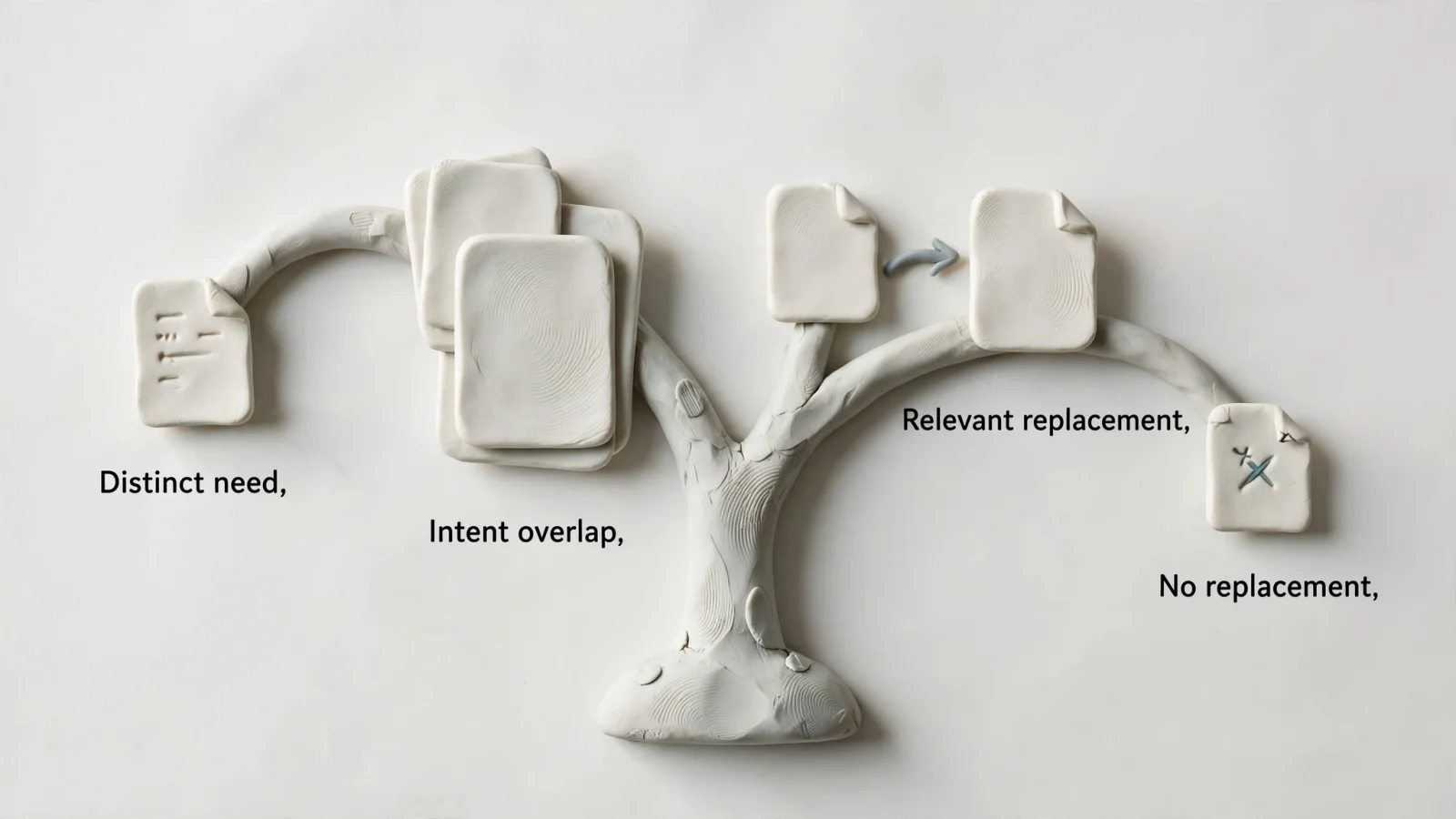
Step 3: Match Each URL to the Right Action
Use the gathered evidence to assign every evaluated URL one of four specific outcomes. Record this decision in your spreadsheet so you avoid repeating the same evaluation next quarter.
| Decision | When to choose this action |
|---|---|
| Keep or refresh | The page serves a distinct reader task, provides useful information or business value, and can be meaningfully improved. Weakness indicates a deficit in depth or clarity, which you fix by updating the content. |
| Consolidate | Multiple pages serve substantially the same task. One stronger destination page can preserve all the useful material, distinct examples, and evidence from the group. |
| Redirect only | The page has no distinct purpose of its own, but a clear, highly relevant replacement page already exists on your site. The old content is not worth migrating. |
| Remove | The page cannot be salvaged, serves no distinct reader or business role, and has no relevant replacement URL on your site. |
When choosing to consolidate, select the destination URL based on its fit with the intended reader’s task, not solely because it currently holds the most clicks. A well-structured, authoritative guide makes a better permanent destination than a thin post that temporarily ranks higher.
Keep canonical tags separate from your redirect strategy. If very similar URLs need to remain accessible to different audiences or software clients, a canonical tag indicates your preferred version to search engines. A canonical tag remains a preference signal. It never acts as a substitute for a relevant server-side redirect when retiring a URL entirely.
Step 4: Implement Changes Without Breaking the Path
Execute your decisions in a specific order to prevent visitors and search crawlers from encountering broken pathways or conflicting signals.
- Publish the consolidated destination. If you are merging three overlapping articles, draft the new combined version first. Combine the distinct examples, supporting evidence, and unique advice from all three sources. Do not stitch together repetitive copy or paste three introductions back-to-back. Edit the new page so it reads as a single, cohesive resource, then publish it.
- Apply server-side redirects. Point the retired URLs directly to their final destination using a server-side permanent
301or308redirect. Never chain redirects together. If URL A previously redirected to URL B, and URL B is now retiring in favor of URL C, update the server rule so URL A points directly to URL C. - Handle removed pages correctly. If the page and its content are no longer available and no similar replacement exists, return a deliberate
404(Not Found) or410(Gone) HTTP status code, as Google's documentation on troubleshooting crawling errors recommends. If the content has moved or has a clear replacement, use a301redirect. For that reason, don't redirect an unrelated retired post to your homepage or a broad category page. Irrelevant redirects confuse visitors who expect specific answers. - Update internal links. Search your site for any internal links pointing to the newly retired URLs. Update the anchor tags in your active posts to point directly to the new consolidated destination. Relying on your server to redirect internal clicks adds unnecessary latency for visitors and forces crawlers to process an extra hop.
- Update your sitemap. Remove the retired URLs from your XML sitemap and ensure the newly published or updated destination URLs are present. Submit the updated sitemap in Google Search Console.
Executing this sequence cleanly takes time. You can rely on a set and forget SEO content strategy to keep your top-of-funnel production active. RankPine publishes well-researched daily articles to your CMS, ensuring your domain continues earning fresh visibility while you manage the technical implementation of your archive cleanup.
Step 5: Monitor Outcomes and Avoid False Conclusions
Assess the results of your portfolio review by monitoring the new destination pages and your broader business metrics. Do not judge the success of a consolidation solely by watching the retired URL’s traffic drop to zero, as that is the intended mechanical outcome of a redirect.
Group the destination URL and the retired URLs together in a Search Console property filter. Watch how the combined impression share shifts over the following weeks. Compare this performance against a suitable baseline period, accounting for standard seasonal dips in your industry.
Allow sufficient time for site-wide improvements to take effect. Google's guidance on core updates says some changes can affect Search within a few days, while its systems can take several months to learn and confirm that a site as a whole is producing helpful, reliable, people-first content.
Check your GA4 dashboards to ensure the business outcomes tied to those topics remain stable or improve. If form submissions on a consolidated guide exceed the combined total of the three previous overlapping posts, the pruning exercise succeeded regardless of minor traffic variations.
What Pruning Means for AI Search
Evaluating how content pruning affects visibility in artificial intelligence platforms requires separating documented search mechanics from unverified third-party claims. Removing underperforming pages from your site does not automatically boost your citation rate in external chat interfaces.
Google’s specific guidance for its AI features establishes that established search engine optimization practices apply directly to AI Overviews. To be eligible as a supporting link in those features, a page must be indexed and eligible to appear in standard Google Search with a snippet. Removing or deindexing a page removes its eligibility entirely. Deleting a weak post does not guarantee your remaining posts will suddenly appear in AI Overviews.
Search features built directly into search engines behave differently than standalone models like ChatGPT, Claude, or Gemini. The evidence driving traditional archive cleanup does not prove that shrinking your site footprint increases citations across conversational LLMs. Those systems retrieve information based on context, authority, and training data prevalence.
Before committing your entire archive to a massive deletion sweep, pilot the review process on a single topic cluster. Record the reason for every merge, redirect, or removal in your spreadsheet. Monitor the destination URLs for sixty days.
To build a reliable presence across both traditional engines and modern chat interfaces, you need high-quality, structured information published consistently. RankPine delivers this exact capability. Our platform provides dual optimization, generating content formatted to rank in Google while remaining structured and authoritative enough for AI models to parse and cite.
Stop letting outdated content drain your site’s potential, and stop writing daily posts manually. Focus your team on strategy while RankPine handles the research, writing, and publishing on autopilot. Start scaling your organic traffic today with RankPine.