How to Optimize Content for ChatGPT Search
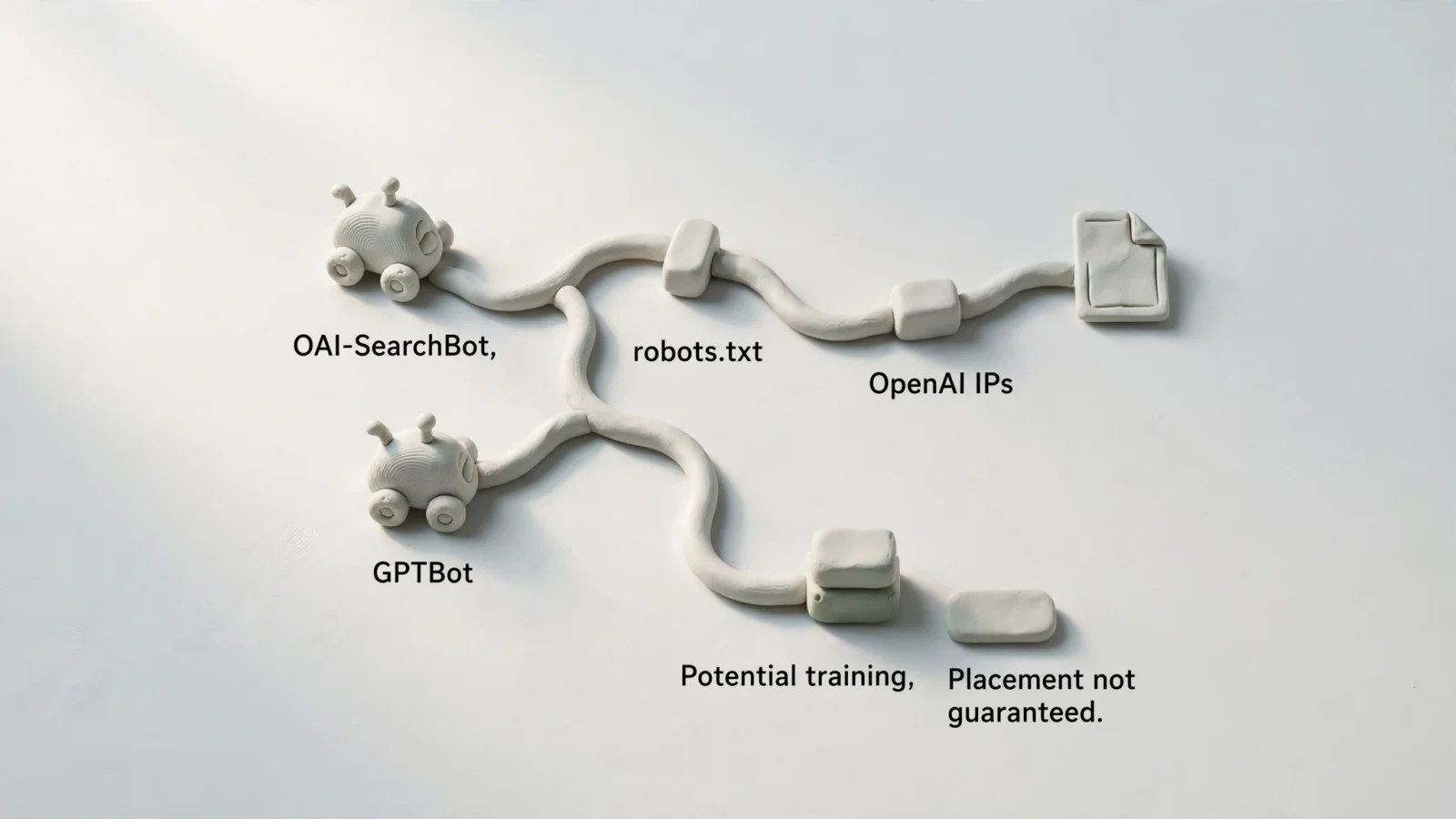
Making content eligible for ChatGPT Search requires separating technical access from editorial selection. A page cannot appear as a citation if the crawler cannot reach the server, and an unreachable page generates zero referral traffic. Learning how to optimize content for ChatGPT search means making your content technically accessible, answering specific user questions directly, and tracking the resulting traffic accurately.
Automating your topic research and publishing workflow with tools like RankPine builds site authority over time, but visibility in AI chatbots still depends on foundational access rules and clear, verifiable writing.
Before modifying your site, understand the three distinct layers of AI search visibility: access, selection, and traffic. Access determines whether OpenAI’s search crawler can load your site, while selection governs whether the underlying model chooses your page to answer a particular prompt. Finally, traffic measures whether a reader clicks the resulting citation link.
OpenAI notes that search results rely on multiple factors, so placement isn't guaranteed. Passing an eligibility check does not force the model to select your page. Optimization in this context means removing technical friction and providing unambiguous answers instead of trying to reverse-engineer a secret ranking formula.
When a person submits a prompt, ChatGPT Search evaluates the conversational request, formulates targeted sub-queries, and routes them to third-party search providers. The system then parses the retrieved pages to extract factual statements, synthesizes those inputs into a conversational response, and presents source links as inline citations. Because this process happens on demand, your website must provide immediate technical transparency and substantive clarity so the engine can evaluate your page without friction.
Many site owners fall into the trap of pursuing speculative shortcuts, such as inventing custom markup files or scattering variations of a single keyword across dozens of superficial posts. These tactics fail because AI search engines prioritize clear contextual relevance and verifiable substantiation over keyword density. Approaching this optimization as a structured technical and editorial process gives your content a reliable foundation that holds up across continuous model updates.
Step 1: Check OAI-SearchBot Access
Before adjusting any content, check that your server permits OpenAI’s search crawler to read your pages. This requires reviewing two different access layers: your site's robots directives and your host's network security rules.
Open your existing robots.txt file to ensure OAI-SearchBot is allowed to crawl the directories containing your informational pages. If you currently block all AI bots globally, add a specific exception for the search crawler. Merge the following rule into your active file without deleting your existing directives:
User-agent: OAI-SearchBot
Allow: /
Carefully evaluate where this directive sits within your file. Robots parsers read directives sequentially or by specificity depending on the server software, so an unorganized global block placed at the bottom of the file could inadvertently cancel your permissions. If your site organizes assets across specific paths, verify that you do not disallow critical scripts or styles that render text visible in the document object model. Keep the rule clean and place it alongside other verified web crawlers to prevent parsing conflicts.
Network security layers often block automated traffic long before it reaches your application. Review your web application firewall (WAF), content delivery network (CDN), or hosting provider's bot-protection settings. Providers like Cloudflare or AWS WAF sometimes flag unrecognized crawlers as malicious traffic, so configure these tools to allow requests originating from OpenAI’s published searchbot IP addresses. Checking your server access logs for 403 Forbidden errors associated with the OAI-SearchBot user agent will reveal whether a firewall is dropping these requests.
Automated security modules frequently challenge incoming requests with managed JavaScript challenges, CAPTCHAs, or rate-limiting thresholds. Because search crawlers cannot interact with browser puzzles, these challenges act as hard blocks. If your CDN maintains a managed challenge list for generic web scrapers, write an explicit firewall rule that bypasses those checks for verified OpenAI searchbot user agents and IP blocks.
Controls for search indexing differ from the controls for model training. The OpenAI crawler documentation identifies OAI-SearchBot as the agent used for ChatGPT Search, while a separate agent called GPTBot crawls data for potential model training. If your goal is to keep your content out of future training runs while remaining eligible for search citations, block GPTBot and allow OAI-SearchBot. Blocking the generic ChatGPT-User agent does not control search inclusion, because that agent performs real-time web requests on behalf of users rather than building the search index.
Maintaining separate directives for these bots prevents accidental self-exclusion. Publishers frequently block GPTBot out of intellectual property concerns, only to discover they accidentally added a wildcard disallow that caught OAI-SearchBot as well. Treat search retrieval and machine learning training as two distinct pipelines requiring independent configuration in your server architecture.
Step 2: Match a Page to a Real User Task
ChatGPT Search reformulates user prompts into background queries before retrieving information. When a reader asks a complex question, the system breaks it down, searches for the component parts, and synthesizes the findings. Repeating an exact-match phrase across multiple thin pages fails under this retrieval model because the chatbot looks for comprehensive answers to the underlying task.
Focus your pages on a specific question that matters to your intended audience. If a user wants to know how to migrate a database, they also need to know the downtime expectations, the backup procedures, and the rollback steps. Group these natural follow-up questions onto a single, well-structured page instead of splitting them across several articles. Create a new page only when it serves a different task.
Understanding this retrieval behavior changes how you plan editorial topics. When a searcher submits an inquiry such as "how do I configure zero downtime database updates for Postgres," the underlying engine might issue separate background queries for connection pooling, data schema migrations, and rollback scripts. If your guide addresses those interrelated requirements in logical sequence, the model can extract every answer from your single resource.
Splitting related answers across separate micro-articles introduces unnecessary friction. A reader who lands on a page containing only a definition must jump elsewhere to find implementation steps, and a language model faced with disconnected fragments will often prefer a unified third-party guide that addresses the entire workflow. Reserve separate articles for tasks where the user audience, operational environment, or underlying objective diverges substantially. A guide on migrating an on-premises database to the cloud addresses a fundamentally different job than configuring a local development environment, making two independent pages appropriate.
Separately, Google's documentation warns against creating pages designed primarily to manipulate automated search summaries, advising against mass-producing variations of the same query. While Google's policy does not dictate OpenAI's ranking systems, it reinforces a shared principle across modern search: topical depth and unique user utility outperform superficial page duplication.
Anticipating the complete context a language model needs prevents you from producing near-duplicates that compete for the same retrieval mechanism. RankPine’s topic research tools help organize this pipeline by identifying distinct, winnable audience questions, ensuring your daily publishing schedule targets unique user needs rather than generating unhelpful variations of the same query.
Step 3: Write a Useful, Verifiable Answer
The internal structure of your article dictates how easily a language model can extract and verify its claims. Pages that bury the answer under long personal anecdotes or vague introductions perform poorly when an AI attempts to construct a direct response.

Open your article with a direct, unambiguous answer to the primary question. Once that fact is established, develop the explanation using descriptive headings that break the topic into logical components. Define specialized terms immediately before using them, and format processes with ordered lists for sequential steps or unordered lists for alternative options. This clear formatting gives the parsing model structural cues about the relationships between your ideas.
This approach follows the inverted pyramid style used in professional journalism. When a user asks an informational question, the conversational engine needs an authoritative summary statement that can be parsed as a standalone extract. Placing this summary within the first two paragraphs establishes the topical relevance of the document immediately, which helps automated parsers categorize the core premise before evaluating the supporting technical details.
Subsequent sections must expand the premise logically. Headings should clearly state the specific question or operational step they contain rather than using vague or stylistic titles. If a section explains database rollback configurations, title it "Database Rollback Configurations" or "How to Configure Rollback Scripts" so the parsing engine connects the heading text directly to the user's underlying search terms.
Support factual claims with reliable sources placed close to the statements they verify. Hyperlink a descriptive phrase within the sentence rather than relying on academic parenthetical citations or a generic bibliography at the bottom of the page, because close proximity between the claim and the external verification increases the reliability of the information.
When an AI retrieval system parses external text, it looks for verifiable facts that confirm the credibility of its generated output. Without a nearby source, the model has less evidence to verify a claim and may choose a competing source with clearer citations. Hyperlinking relevant industry reports, documentation repositories, or official engineering guidelines directly within the prose provides clear evidence that the claim is substantiated.
Adding original analysis, concrete examples, or firsthand experience gives the model a reason to cite your specific page, whereas summarizing other ranking articles provides no unique value for a retrieval system that can already read those sources. Explaining the reasoning behind a technical decision or detailing a specific failure mode provides the concrete evidence that makes an answer trustworthy.
Include specific trade-offs and operational constraints rather than presenting theoretical scenarios. If a recommended technical architecture increases memory usage by a measurable margin, explain that consequence explicitly alongside the benefits. Providing honest evaluations of drawbacks and limitations signals high editorial integrity, which helps your content stand out against generalized overviews that repeat obvious definitions.
Step 4: Keep Technical SEO and Publishing Quality in Place
Standard technical optimization still governs how easily any bot discovers and processes your pages. A clear internal linking structure ensures the crawler finds new articles without relying entirely on an XML sitemap. Important information needs to exist in readable HTML text, as relying on client-side JavaScript to render core facts introduces unnecessary friction for crawlers trying to index the content efficiently.
If your website relies on a single-page application framework or dynamic client-side hydration, verify that your raw HTML output contains the full text of your articles. Web crawlers operating at internet scale manage finite computational budgets, meaning they may not execute delayed client-side scripts before recording the page content. A page that renders as an empty wrapper until a JavaScript bundle finishes loading risks being indexed as blank or incomplete, removing it from candidate pools during dynamic retrieval.
Google's AI features documentation says pages must be indexed and eligible to appear in Search with a snippet, and that there are no additional technical requirements. It also recommends that structured data match visible page text, so keep your markup accurate rather than adding special AI requirements for Google's features.
Speculative practices, such as assembling custom llms.txt directories or attempting to feed prompt instructions directly into HTML comments, provide no documented ranking benefits according to official OpenAI guidance. Crawlers prioritize the clean, accessible text visible to human readers. Adding layers of unverified markup bloats the document and introduces maintenance overhead without improving citation performance.
Automated publishing works best with a quality gate focused on factual accuracy and distinct value. While RankPine handles the mechanical burden of researching topics and publishing directly to your CMS, the underlying content still needs to add depth. Review scheduled articles to ensure the factual claims hold up and citations point to appropriate primary sources. Generating hundreds of pages without adding user value degrades site quality across all platforms, so ensure each published piece answers the intended question thoroughly and contributes distinct insights.
Google’s published search documentation permits using generative tools for drafting and research, but warns that generating large volumes of uncurated pages lacking original substance violates its scaled-content policies. Maintaining high quality means verifying that every article addresses a distinct audience need and contains accurate technical statements. A daily publishing cadence can help build a broad library of resources, though publishing volume alone is an unverified ranking factor in ChatGPT Search. Quality, factual accuracy, and editorial relevance remain the criteria that govern visibility.
Step 5: Measure Access, Citations, and Outcomes
Visibility in AI search is not a single metric you can track in a standard dashboard. Because chat interfaces generate dynamic responses based on conversational context, you measure the three layers of the process separately: technical access, citation visibility, and referral outcomes.

Start by reviewing your server logs weekly to isolate requests from the OAI-SearchBot user agent. HTTP 200 status codes confirm successful crawls, while recurring 403 or 401 errors indicate a problem. If you spot these errors, return to your security settings and check for updated IP blocklists or aggressive rate-limiting rules catching the crawler by mistake.
Log analysis serves as your earliest diagnostic alert. You can isolate searchbot requests by running terminal commands against your access logs or filtering your analytics dashboard for the specific user-agent string. Watch for redirect chains that return multiple HTTP 301 statuses before reaching the final URL, as unnecessary redirect hops waste crawler resources and can cause the bot to abandon the request before indexing your content.
You can test citation visibility by running directional audits on your most valuable user questions. Periodically enter these queries into ChatGPT Search and record whether your pages appear in the response text or the linked citation brackets. Treat this as a directional health check rather than a stable rank position. Because the model formulates answers dynamically, a citation today does not guarantee one tomorrow, which means you need to monitor overall trends rather than reacting to a single missing link.
To ensure consistency in your manual audits, assemble a static spreadsheet of twenty to thirty buyer-focused prompts that reflect high commercial or informational intent. Test these prompts using private browser sessions without logged-in account history to minimize the impact of personalized memory on the returned results. Record the date, the exact prompt, the presence of your domain in the answer citations, and the specific competitors appearing alongside your brand. Tracking these manual tests over weeks or months reveals broader movement in your topical visibility.
Track the actual outcomes using your site analytics platform by filtering for referral traffic originating from chatgpt.com or specific UTM parameters attached to incoming URLs. It is important to distinguish clearly between a citation and a click. A page might be referenced frequently in chatbot answers without driving meaningful visits if the AI’s summary satisfies the user's curiosity. Conversely, a technical tutorial might receive fewer total citations but drive high-converting traffic when users need to read the full code snippets on your site.
Measuring the commercial return of this traffic requires reviewing post-click behavior. Segment your analytics reports to observe how visitors arriving from chat interfaces interact with your site compared to traditional organic visitors. Review metrics such as average session duration, bounce rates, and conversion events on key actions like newsletter signups or product purchases. If chat users bounce quickly, examine whether your page structure delivers on the promise made by the chatbot's summary or if the landing experience feels disconnected from the user's initial inquiry.
Google Search Console reports performance for Google Search and Google's specific AI features, but it does not track ChatGPT Search visibility, so be careful not to confuse impressions in one ecosystem with success in the other.
Google’s reporting tools measure behavior within its proprietary index, reflecting user queries submitted to standard Google web search or Google AI features. ChatGPT Search utilizes an entirely different infrastructure, combining its own crawler, specific index partnerships, and dynamic reasoning models. Conflating the two platforms leads to incorrect optimizations, such as removing a technical page that performs well in ChatGPT citations simply because it registers low impression volume inside Google Search Console.
If your analytics show zero AI referral traffic, troubleshoot the layers in order. Check your robots rules and server logs first. If the crawler can access the site, review your directional audits to see if the model selects your pages. When pages are cited but generate no visits, evaluate whether your content gives readers a compelling reason to click through for more detail.
Resolving an absence of clicks often requires refining how your content delivers value. If your article provides only concise, high-level summaries, the chatbot can synthesize the entire answer directly within the conversational interface, leaving the reader with no need to leave the chat. You can address this by providing in-depth supplementary material, such as downloadable configuration templates, comprehensive data comparison tables, or interactive tools that cannot be reproduced within a brief conversational snippet. Giving the reader an obvious reason to explore the full resource turns passive citations into active referral visits.
Building a reliable flow of organic traffic requires publishing well-researched, clearly structured answers consistently. RankPine automates topic research and publishing by identifying winnable topics and publishing useful, properly cited articles directly to your CMS each day. If inconsistent freelancer schedules and blank pages are slowing your work, visit RankPine to build a steadier content workflow.